
All posts by Mindful tester

Tweaking My Blog Accessibility

Accessibility is something which is within my reach. It just took me some years to use it properly.

If you are in a hurry, just go to the Accessibility Tips. If you have more time, you can start with the next paragraph. Next.

Sleight of thought

For my blog I use a default WordPress theme. I try to compensate this standard look and feel with humour. Am I kidding? No.

My first blog post was a struggle with looks. I did not like header 1. The font was too big. I just used bold to make the headers. That looked just right.

During an online computer course I had my first encounter with a screen reader. Users with bad or no view can use this program to read a web page aloud.

My trick for nice headers using bold was backfiring: a screen reader would not recognise them as headers. I really needed some header tag. So I ended up with header 6. This looked good, but it was still not right.

Just a little more

After tensome blogs I started to use the alternative text of the image.
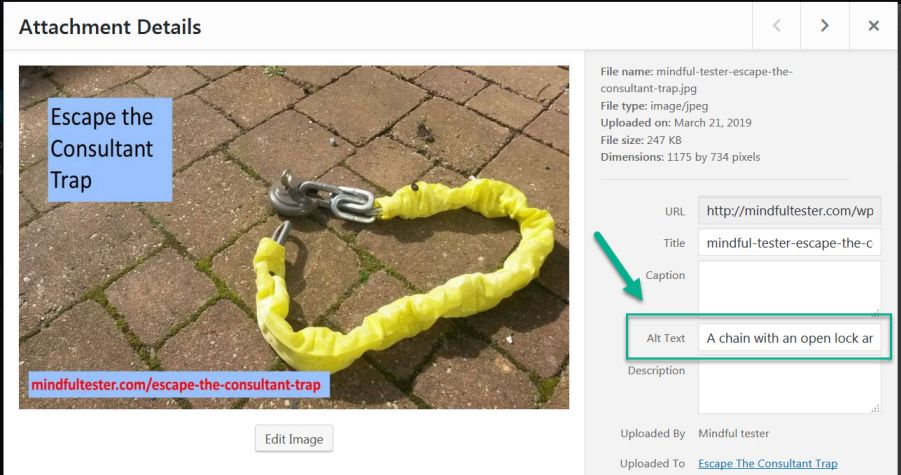
In the attachment details of the pciture the location of the Alt text has been marked!!
In the past this was primarily used for people with slow internet connection. This way they still could get an impression of the webpage, when the text was shown.

In another online course I learned that the screen reader could use this for the communication. Then I read a tweet about using a proper description. So “another mindmap” was not really helpful.

Now I had to compress the information in a picture in a few sentences. That was really tricky, if some graph was involved.
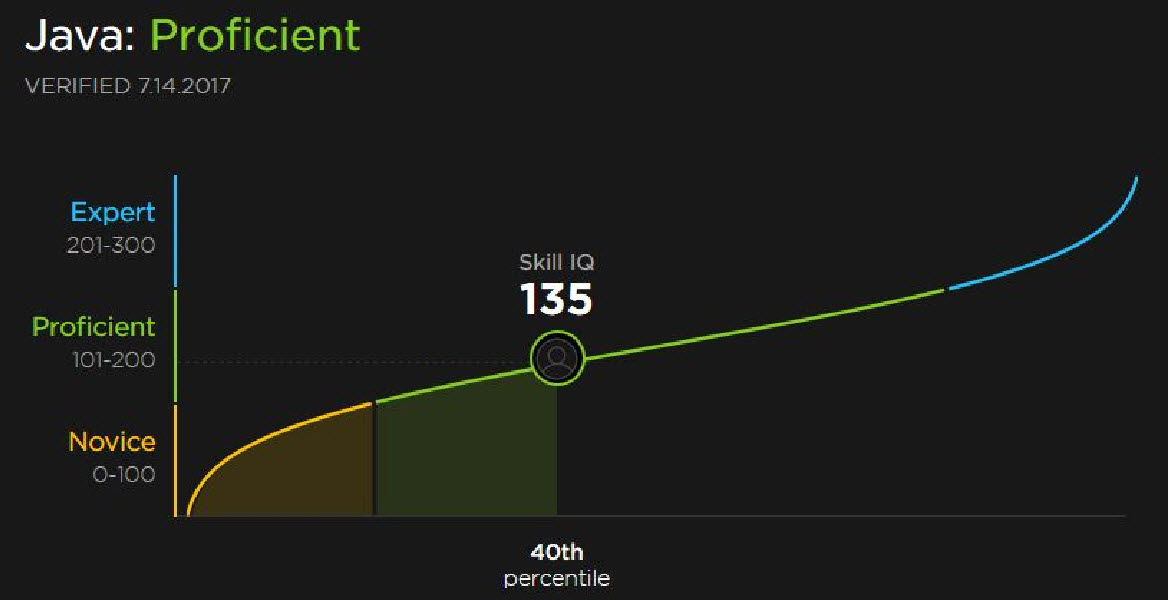
A line graph is shown with three different colours: orange for beginners, green for proficient, and blue for expert. There is a green circle "Skill IQ 135" in the green line, which is connectd to a vertical line with "40th percentile" at the foot!"
The Alt text is as follows:
“A line graph is shown with three different colours: orange for beginners, green for proficient, and blue for expert. There is a green circle “Skill IQ 135” in the green line, which is connected to a vertical line with “40th percentile” at the foot!”

Maybe you noticed the exclamation mark or ! at the end of the text. This is a trick I learned later one: the screen reader reads this text differently aloud.

I even made a blog post with a few screen reader tricks. In this particular post a screen reader user has a big advantage over a user using a normal view.

More exploration from my side

The trick with header 6 was not right. I just knew. A lot of people start counting from 1, programmers from 0. But 6 is not the right exception.

It was a matter of months that I read about a confused screen reader. So I better start from header 1. Which was not my big favourite.

On Twitter I saw a tweet of a user with a bad view complaining about bad contrast. Within minutes another blogger reacted by adjusting his website.

My turn

I did quick check of my blog. It was all black characters on a white background. Then I noticed that my quotes were vague.

Now I had to find a way to change my headers and quotes. Time to explore the Content Management System or software to maintain my blog. Mine is called WordPress.

I first focused on the desired look of my header. I opened my word processor for note taking. My goal was to have my header 1 to look like header 6.

There was a nice tool in my browser: Dev Tools or Developer Tools. In my browser on my Windows machine I pressed F12, scrolled down to a header, selected the element, and saw the properties.
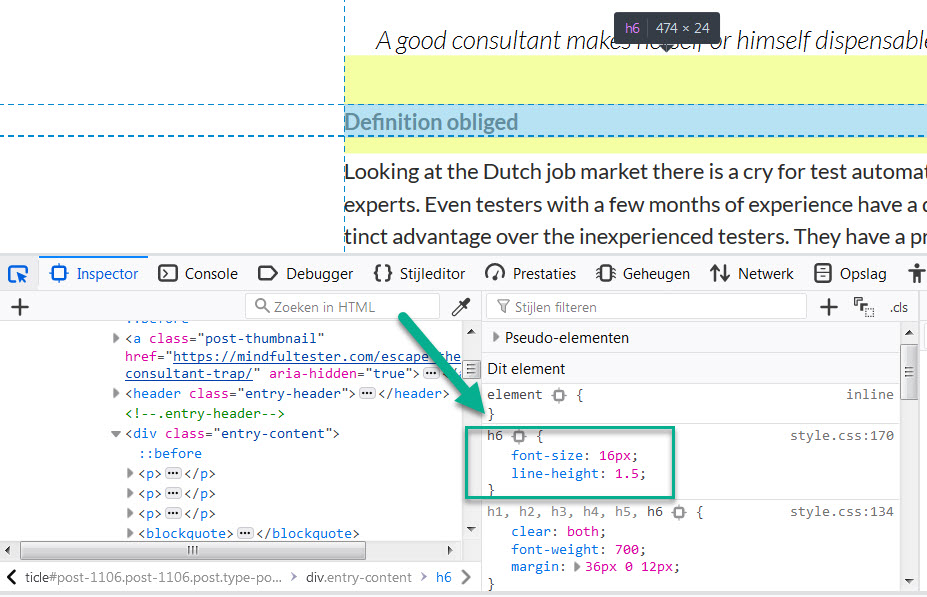
After the selection of header 6 in the upper window the properties of this element are shown in the right bottom window!

I did the same sequence for the quote. In HTML it is called blockquote. Fine with me.

The colour was grayish. I started to play with all kinds of colour codes. Until I realised that “black” was also good description for a font colour.

Dev Tools allowed me to experiment with the properties of the block quote without an intimidating program.
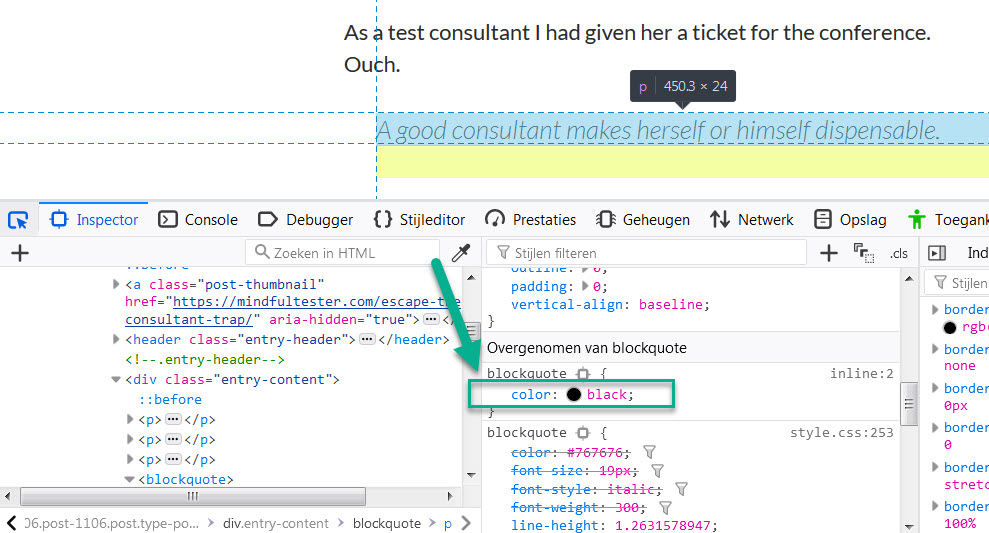
The color of the bloack quote has temporarily been changed to black!

Easy does it.

Now I had two pieces of code. Somewhere I had to fit them in. I started touring the CMS or Content Management System and found Additional CSS using the following path
Dashboard => Appearance => Customize => Additional CSS.

CSS stands for Cascading Style Sheets. Suppose I change the look of header 1 at 1 place. It will affect the look of all headers 1 in my whole blog. Cascading is cool.

I was too early for claiming my victory. Header 1 did not change in the visual editor. I did a preview and it looked right. Okay, found something.
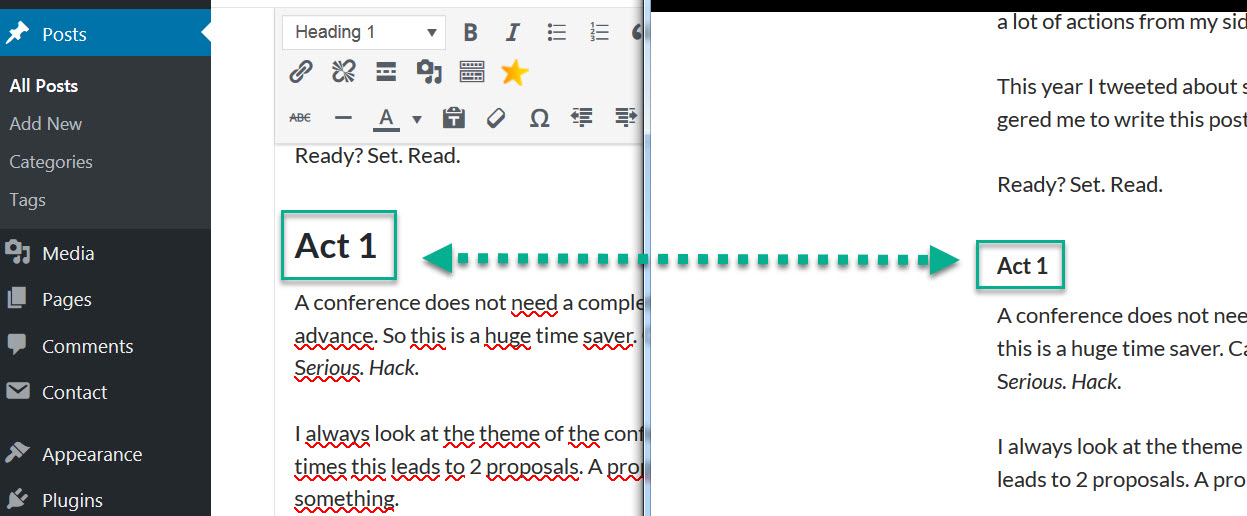
In the left window Header 1 is shown in the Visual Eidotr, in the right window header 1 is shown in the preview!

At the end I had changed all headers 6 to headers 1.
So I only had to modify all the headers of my remaining blog posts. Great. Extra work.

The change of colour in the block quote went smoothly. But I was not pleased with the vertical alignment of the quote. It was too close to the left margin.

On the web I discovered that margin of an object was used to place a rectangle around the quote. Another search led to padding. If I could pad the text in the quote, then it would shift to the right. Left padding was enough.
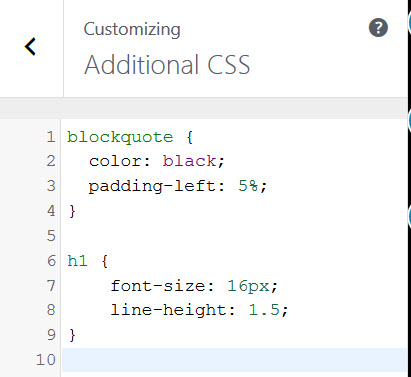
Additional Css contains: "blockquote { 	color: black; 	padding-left: 5%; }  h1 {     font-size: 16px;     line-height: 1.5; } "!

Because I had only used block quotes for quotes, all quotes in my blog were automatically modified.

Accessibility tips

  • Use header to mark headers instead of making them bold.
  • Add an alternative text ending with an exclamation mark to all pictures.
  • Make the contrast of the colours of the text and background bigger instead of using some gray colour on a white background.
  • Use Additional CSS in WordPress, if you are still not pleased with the look of the elements on the page.
  • Look for other ideas on the Global Accessibility Awareness Day website. For the record it is the third Thursday of May every year.GAAD almost encircled by a powercard attached to a keyboard!

Ending notes

  • I know that there are enough readers willing to check the accessibility of my blog. The status of accessibility on my blog is in progress.
  • At the moment of publishing this post there are still words in bold who look like headers in my first blog posts. There are still pictures without an alternative text and/ or exclamation mark.
  • I would not be surprised that there is still work to be done after all these updates.

Escape The Consultant Trap

During a talk at a test conference a consultant told smilingly to stick to customers. The woman next to me was bristling. Her company hired consultants.

Is there a way to make this situation more painful for me?
You bet.

As a test consultant I had given her a ticket for the conference.
Ouch.

A good consultant makes herself or himself dispensable.

Definition obliged

Looking at the Dutch job market there is a cry for test automation experts. Even testers with a few months of experience have a distinct advantage over the inexperienced testers. They have a proof that they can use the demanded tool. And they are hired.

So if a company really needs test automation and no candidates have been found, then a test automation expert is flown in. This gives the company a real advantage. Or wings for the intended pun.

What is the consultant trap? After a while there is a test framework and lots of scripts and impressive heaps of test data which must be executed, updated, and maintained. In good order.

It is like buying a car which needs intensive care. If it is neglected for too long, then the car will not ride.

All the test automation stuff can be compared with a car. The mechanic is the test consultant.

No consultant means no working test automation, which means no edge, less revenue, and stronger competition. The company is trapped. This also hurts the revenue.

Path obliged

There are some managers who would object with

  • “This is a proof of concept.”
  • “The product is at the end of the life cycle.”
  • “The consultant is only hired during the holiday of one of my employees.”

These sound like sound arguments.

In this blog post I want to focus on test automation experts who are the only ones to operate the test automation in a company.
That’s bad.

Suppose you are a manager and you have the task to improve test automation. Now you have to avoid the consultant trap.

But you still need a consultant to teach test automation to your team member.
Hummm.

According to me a good teacher doesn’t make the homework of a pupil. In terms of test automation a consultant is helping your team member with learning instead of putting all test automation in place.

Don’t touch everything.

Is there a way to determine whether a consultant is a good teacher?
Sure.

Ask to explain how to set up test automation in plain language. Or ask for possible first steps in your company. Other useful resources are recommendations of other customers, talks, or blog posts.

My suggestion is to keep the number of hours of the consultant low and the number of hours spent by your team member high.

My favourite way to learn something new is pairing. As a pupil I like to share the same computer with an expert while figuring out what is happening. The teacher (she or he) demonstrates things to me and then let me struggle.

Pairing is an activity for 2 persons. I do not like searching the right note with fast scribbled words on it because of the high pace of demonstration. And then interrupting my teacher who is teaching someone else in the meantime.

Attention!

While I was learning Test Driven Development, a junior DevOps engineer was watching every step I took.

Once in a while he made remark. Then I told my thoughts aloud and he would gently lead me to the right solution. He had an educational degree and earned my respect.

In short it is about finding the right balance between demonstrating and experimenting.

Another way for me to learn is exploring. Elisabeth Hendrickson made a nice concise format for this:
Explore < target > with < resources > to discover < information>.

I personally like exploring because of the hidden treasures I might find. Dungeons and diamonds.

OK. Back to the Example.
(No DeLorean included.)

A consultant could suggest something like
“Explore data driven testing with Postman to discover a concise way to maintain test scripts.”
A bit vague.

I tend to ask questions.
“What is data driven testing?”

A good teacher will give some examples:
“Suppose you buy 2 items costing 1 Euro each. What will be the total cost?”
“2 Euro.”

“And if you buy 4 items costing 1 Euro each. What will be the total cost?”
“4 Euro.”

“6 items for the same price?”
“6 Euro.”

“23 items.”
“23 Euro.”

“What did you notice?”
“The question became shorter. And you only changed the number every time.”

“So the numbers are data. What I described were 4 simple tests. In Data driven testing a tester or developer extracts data from the tests. So you only need 1 test with a set of data.”

“What would be a good to store the data?”
“A table like in spreadsheet program.”

And this conversation and experimentation could continue for hours.

After the session a debriefing can take place to reflect and determine new points of interest.

After a while I could explore on my own. If I get stuck, then I could contact the consultant.

Let me write about exploration of data driven testing on my own.
“What is the first place to look for?
I don’t like manuals.

Wait. This is cool:
TestAutomationU offers a free online course from Amber Race about Postman.

It contains a section about data driven testing.”

For the video I used sketchnotes for note taking. When I did some experimentation in this course, I used a word processor for notes.

Also now a debriefing is the way to reflect and to determine new steps. A consultant or colleague can be a person to speak with.

Proposal obliged

If there is a company where I would like to work, then it is the one with experimentation and growth mind set. It will earn my loyalty.
Hold my engineer degree.

As a manager you might complain about the time spent. As an Agile practitioner I would answer that competitors might outperform your company by learning and teaching.

In summary hire people with ability to learn and ability to teach test automation.
Thank you for your attention.

Okay time for the legal stuff.

Disclaimer: I have no experience with this approach to escape the consultant trap. I did not do any research. But I do welcome feedback.

According to me this proposal is agile. You learn and adapt. Luckily agile is in high demand.
Say Cheese.

Disclosure: at the moment of publication I wa jobless, so I was biased.

Struggling to become a DevOps engineer

Sometimes when I am cooking, a bored kid asks:
“How can I help?”
My answer is:
“You can cut the vegetables.” Or
“You can stir in the pan.”

When my kids were smaller, they loved to make pizza. And even small hands are handy for peeling off the brown layers of an onion.

Pair programming

The Test column was empty for a few days and I had finished all preparations for the items in progress. Was there a way that I as a tester could help the DevOps engineers?

“We can do pair programming.”
I was all ears and eyes. So I joined a programmer while he was coding. Once in a while he said his thoughts aloud.

“Okay, now it is your turn.”
I looked at the DevOps engineer expectantly:
“What do I have to do?”
“Programming”
“I mean: what must I program?”

A short dialogue followed. My knowledge of the development environment was almost zero and I did not know everything about Java.
“You better take a course at Pluralsight.”

Pluralsight and Java

In this company every DevOps engineer and the tester (that’s me) had access to Pluralsight. Courtesy of the employer. Pluralsight is an online course platform with a massive load of courses.

“There is a test to determine how good you are.”
Sure no problem.

A line graph is shown with three different colours: orange for beginners, green for proficient, and blue for expert. There is a green circle "Skill IQ 135" in the green line, which is connectd to a vertical line with "40th percentile" at the foot!"

A lot of readers might think:
“Wow, I would hire Mindful Tester.”
Sorry gals and guys. Up to 40% of all people got this level. This basically means that 2 out of 5 people knew as much about Java as me. Not enough to make complex changes.

Now Pluralsight had another nice feature called learning path. So I dutifully cruised through the courses. I had the advantage of two screens, so I could play the course on 1 screen and program on the other 1.

I had some doubts about the courses. It was like a typing course. Just enter the text and you have a working program. Tada.

Another doubt was the absence of Test Driven Development. I shared my concern with a bright DevOps engineer. He reassured me:
“First focus on the language, then the rest will come.”

The same engineer noted the lack of challenge, so he referred me to project Euler. This free online platform had mathematical / programming problems. Afterwards he reviewed my Java code, which I really appreciated.

Java is great, but my team used more tools to develop programs. So I followed courses on Spring and Maven.

At the end of the course I could get some certificate. With no real practice I had some knowledge. On the other hand my experienced DevOps engineers loved Pluralsight. They set the video speed to double speed and picked up their nuggets of knowledge.

HTML, CSS, and JavaScript

“I noticed that you focused on layout.” my scrum master said.
“We need someone who can design good interfaces. Maybe you should focus on the front-end.”

In this company the front-end was a website. So I had to study HTML or HyperText Markup Language, the basic programming language of web pages. I was familiar with HTML. <b> hello </b> is shown as hello. b is short for bold.

I picked a Pluralsight course for advanced web development. This was both horrifying and clarifying.

So I should have basic JavaScript and CSS knowledge. I picked a course with JavaScript: CSS was needed. I switched to CSS. Only HTML was needed. Phew.

What is CSS or Cascading Style Sheets? In my own words it is a way to style a website in s consistent style. E.g. all the buttons look alike and the web page can respond to different screen sizes.

I followed two courses of CSS. They were practical, so I was able to modify the look and feel of a website without changing the functionality.

Next stop on Pluralsight was JavaScript. In my own words this language is used by browsers on the computers or mobile phone of the users. This programming language basically reduces the traffic between the front-end (e,g, website) and the back-end, where the important things happen like handling a payment.

I was lucky again. There were some basic courses which gave me some practice with JavaScript.

If I look at Pluralsight there are some good courses, but it took time to find them.

Edx.org

The biggest disadvantage of Pluralsight was no examination. My scrum master found an interesting alternative, edx.org.

You could call it freemium. The course and examination are free, but you have to pay a premium for the certificate.
Freemium is “free premium” without ” pre”.

I picked HTML5. The course was for beginners. But I was really happy with all the Pluralsight knowledge obtained. The course gave me a good insight in HTML5, but it also showed its limitations.

Next certificate was CSS Basics. Again I had an advantage and obtained enough points for a certificate.

ReactJS should be possible with my basic knowledge of JavaScript. In my own words ReactJS is a language, which can better interact with users than HTML5. The course was tough and I dropped out.

Edx.org and Pluralsight

Edx.org had the same choice problems as Pluralsight. I had to follow course parts to determine whether there was a click.

A major difference is, that Edx.org courses are time bound. After a deadline the course is closed and only accessible for old students of this particular course.

Edx.org has a slight advantage that it offers up-to-date information. Pluralsight has some old courses. For a Maven course this is tricky. Old versions as shown in the video cannot be used.

Another deadline disadvantage of edx.org is that timing is personal. Several courses acquire 2 hours a week. For someone new to coding this number is too low. Sometimes one block of 2 hours would take me 40 hours. There is also a deadline for a certificate. My advice is first to get the required numbers of points and then buy the certificate.

Once I bought a discounted certificate before getting the required points. Let me write it was not my best investment. There are limitations to be aware of.

Security, privacy, and usability

A DevOps engineer does more things than programming. So I learned about website security, privacy laws, and usability.

In the meantime I acquired some DevOps skills like looking in and understanding log files.

Status update

In April 2018 I got the disturbing news, that I was fired.
No bingo for me.

In case you want to know what I am doing right now.

Thanks for reading. I really appreciate it. Cheers.

Other online courses

This year Trish Koo asked for some online programming courses In the answers there are some online platforms I will try the next time.